
Use the Work pane
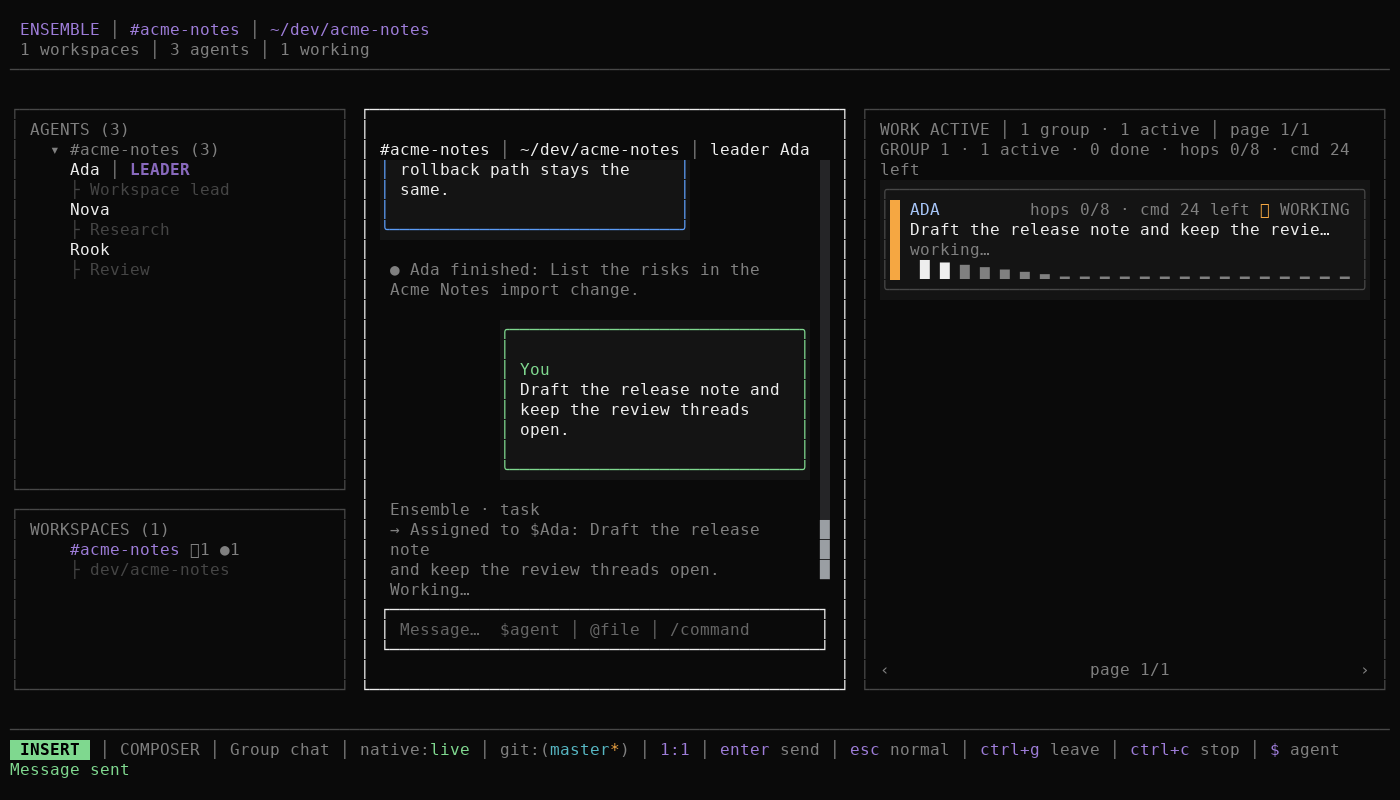
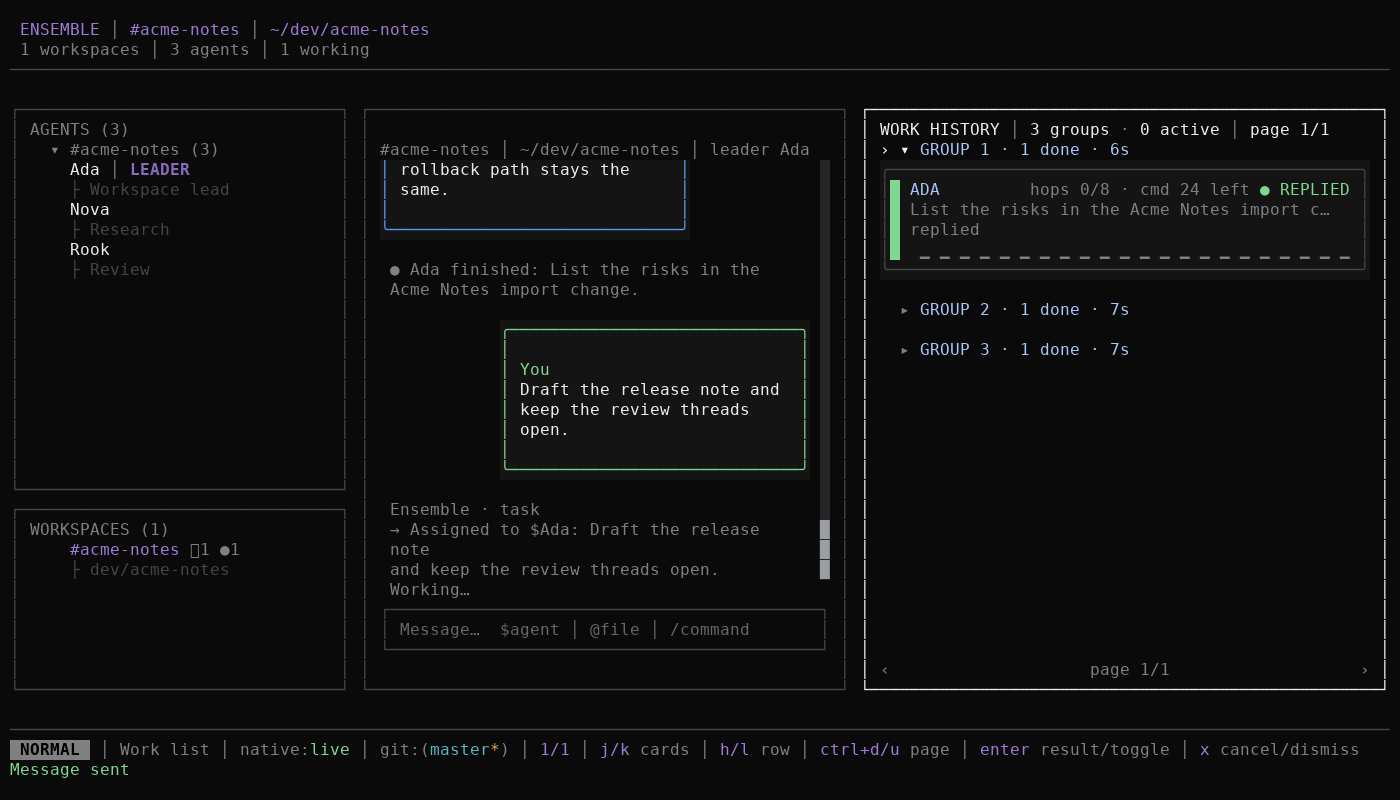
The Work pane is the right column's view of the conversation's work items. It shows what is live in ACTIVE and what finished in HISTORY, and it offers only the actions the focused work item can run.
Before you start
- A workspace group or direct chat is open.
- At least one message has created work, or you are ready to send one.
- Read Work lifecycle for the status words and Dispatch budgets for the budget label.
Steps
Press
Tabuntil Work is selected, then pressEnterto enter Work interaction. The pane opens on ACTIVE. Each work item shows the assignee, status word, and a budget label such ashops 3/8 · cmd 21 leftwhen the width allows.Move between work items with
h/j/k/l. Usegg/Gfor the first or last work item,Ctrl+d/Ctrl+ufor a half page, andPageUp/PageDownfor a page. When focus reaches an edge, the same direction pages instead of stopping.Press
fto switch between ACTIVE and HISTORY. ACTIVE holds queued, working, waiting, retrying, needs-you, and stalled work. HISTORY holds replied, failed, and cancelled work. A dispatch group can appear in both views with different work items.Press
Enteron a focused work item to open its durable result when it has one. In HISTORY,Enteralso expands or collapses a finished group.Dclears the history view; that dismissal is a display choice, not deletion.Press
dto delegate. Choose the recipient, confirm the work item title, and edit the instruction, then submit. A child work item appears in the same dispatch group, and the parent work item reads WAITING while the child runs.Press
tto reassign. Choose another member. The existing work item changes assignee. The conversation and workspace membership do not change, and the work item keeps its history.Press
rto retry a failed, stalled, retrying, or cancelled work item. The item returns to the queue and then runs again. Use retry when the work should start from the same instruction after a transient problem.Press
Rto restart any non-replied work item. The row is requeued with a Restarting work notice in the transcript. Use restart when you want the same item to run again from a clean stopped state, including while it is working, waiting, or waiting for you.Press
xto cancel the focused work item. The work item shows Cancelling… until the durable update lands, then CANCELLED and leaves ACTIVE. Cancelling closes stale approvals for that work. It does not refund a hop already spent.Press
oto open the assignee's native session for the focused work item. PressF2to return to Ensemble. A focused native-subagent work item opens that child session instead.
Expected result
- ACTIVE and HISTORY show the same durable Work rows, split by status.
- A delegated child appears under its parent, and the parent waits for it.
- Reassign changes only the assignee. Retry and restart requeue the same row.
- Cancel ends the run and leaves the work item in HISTORY.
- The native session opens in OpenCode, not inside the Ensemble panes.
Troubleshooting
- A key does nothing. The work item advertises only valid actions. Replied work items are read-only, and retry is absent until a work item is retrying, stalled, failed, or cancelled.
- A work item stays in ACTIVE as STALLED. Stalled is not terminal. Retry, restart, or cancel it.
- A work item shows a budget ceiling. A continuation or delegation can be refused when a command, group, task, or depth ceiling is reached. See Dispatch budgets.
- "No native session" appears. The assignee has no binding for this conversation yet. Send one message in that conversation, then try
oagain.
Next
- Resolve approvals: decide the work that waits for you.
- Work lifecycle: read each status in detail.
- Native sessions: understand what
oopens. - Keyboard reference: exact Work-list bindings.