
Configure an agent
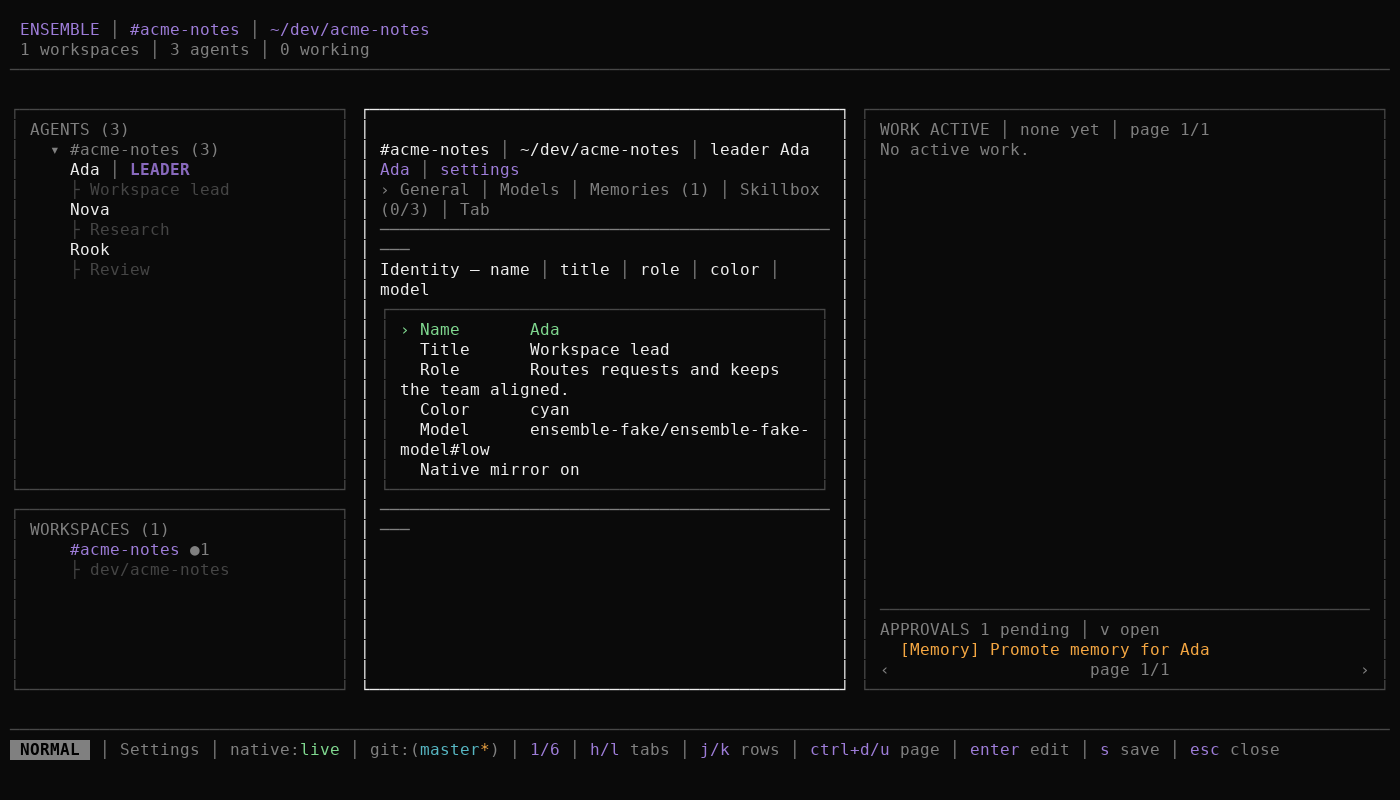
Agent settings are a draft until you save them. The tabs cover identity, models, memories, and the Skillbox; memory management has its own guide.
Before you start
- The agent exists in the roster.
- OpenCode reports the models you want to choose.
- Read Agents, workspaces, and the leader and Skills for the concepts behind the fields.
Steps
Select the agent in the rail and press
s. Settings opens on the General tab. The header shows the agent name and UNSAVED after the first edit.Move with
j/k, switch tabs withh/l, and pressEnteroreon a row to edit it. PressEnteragain to finish a text field. General edits the name, title, role, color, main model, and the native-mirror toggle. A name must stay unique among active agents.On Models, press
Enteron the main-model row to open the picker. Choose a provider and model, then a reasoning effort when variants are offered. Backups appear below the main model.Press
ato add a backup model,xto remove one, andJ/Kto reorder the list. The order is the fallback order. Ensemble tries a backup only when the main model has an availability failure. It announces a switch in the transcript.On Skillbox, press
/to filter,j/kto move, andSpaceto assign or unassign a skill. See Use a skill for invocation.On Memories, add, edit, delete, or promote entries. See Manage memory for the memory workflow.
Press
sto save and close settings. Ensemble validates the draft, saves it, closes the surface, and shows oneSaved <name>.confirmation. PressingEscwith unsaved changes asks before discarding them.
Expected result
- The rail and settings show the new name, title, color, and model summary after saving.
- A saved role, main model, backup list, or Skillbox applies to the agent's next turn in its existing native session. A turn that is already running keeps the settings with which it started.
- The native-mirror toggle changes whether prompts typed directly in the agent's native session are mirrored into the Ensemble conversation. It does not change host tool permissions.
- Unsaved edits do not affect any turn.
Troubleshooting
- "Agent name already exists: <name>." Choose a name no other active agent uses.
- "No models are available." Check the OpenCode provider configuration and reopen the picker.
- The header still says UNSAVED. Press
sto save. Closing withEscasks before discarding a dirty draft. - A saved Skillbox skill is rejected at invocation. The host catalog may no longer offer it. Remove the stale assignment and choose an available skill.
Next
- Manage memory: curate what the agent remembers.
- Use a skill: invoke an assigned skill.
- Use the Work pane: see the next turn apply the saved settings.
- Configuration reference: exact stored agent and workspace fields.