
Ensemble documentation
Ensemble is a persistent agent team inside OpenCode: one group chat, named agents, visible work, and each agent's native session underneath. These docs help you install it, learn the mental model, complete common tasks, and look up exact behavior.
Version scope: stable 0.1.x, current v7 roster contract. Verified on OpenCode 2.2.6, 2.2.7, and 2.3.0 on Linux/tmux, with Node 22.23.4 or newer. Prerelease history lives in the changelog, not in a separate docs tree.
See it in motion
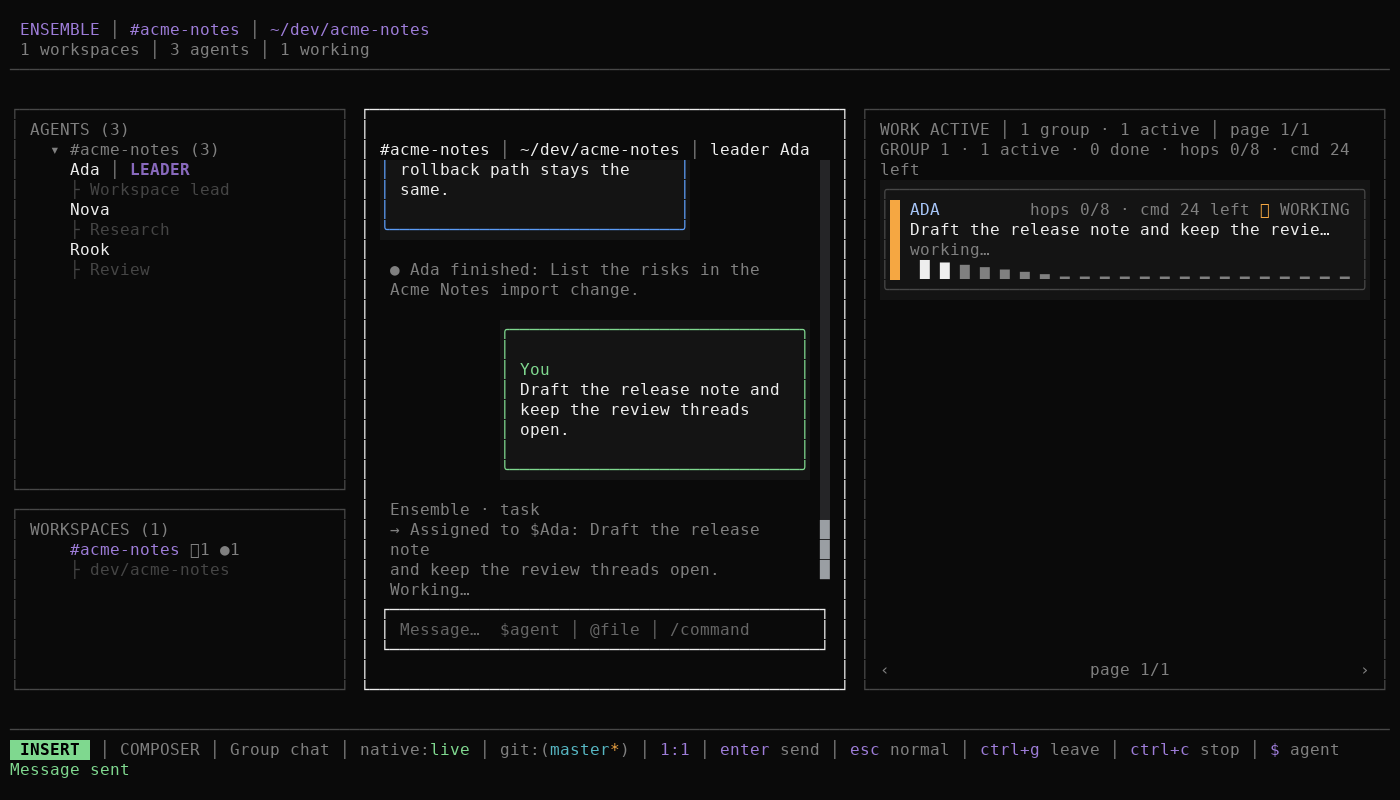
Text summary of the replay
- The stable install command is shown at an isolated shell prompt.
- OpenCode starts and
/ensembleopens the workspace. - A group message is assigned to the leader, Ada.
- Work shows Ada's card as WORKING with its hop budget.
oopens Ada's native session, where the release note runs.
The recording is a scripted replay of an isolated synthetic fixture. The install command is illustrative; the workspace, messages, Work card, and native session were captured from the local OpenCode host. Reduced-motion settings keep the poster visible until you press play.
The replay covers the stable install command, /ensemble, a group message, the work item, and the native session underneath. Read the quickstart for the same path as copyable steps, or the workspace shell for the pane model.
Start here
| I want to… | Start with |
|---|---|
| Install Ensemble and get a first reply | Getting started |
| Understand agents, workspaces, and routing | Concepts |
| Finish a task in the app | Guides |
| Look up a command, key, tool, or setting | Reference |
| Back up, upgrade, or recover an install | Operations |
| Fix an install, work, timeout, or model failure | Troubleshooting |
| Check install tags, platform limits, and diagnostics | FAQ |
| Find support, recovery, security, and privacy in one place | Operations and support |
| Assess security or privacy | Security or Privacy |
| Get help or report a problem | Support |
| Contribute code or documentation | Contributing |
Learning paths
New users
- Read What is Ensemble? and check the support matrix before you install on an unverified host.
- Follow Install for the stable
0.1.1package. - Complete the Quickstart: two agents, one workspace, one message, and one finished work item.
- Continue with First team to delegate work and open a native session.
- Use Upgrade when you move from a prerelease.
Daily users
- Learn the shared language in Concepts and the domain glossary.
- Use Guides for routing, the Work pane, approvals, and settings.
- Keep the keyboard reference open while you work.
- Look up exact behavior in Reference when a guide is not enough.
Team leads
- Read Concepts for the leader, group chat, turns, work items, and dispatch budgets.
- Follow Guides to create a workspace, add members, and delegate work.
- Look up exact limits and commands in Reference when a delegation is refused or an agent stops.
- Review support and operations before asking a team to depend on the preview.
Operators
- Start at Operations for backup, restore, upgrade, and rollback.
- Read Scale, soak, and local diagnostics for the tested envelope and evidence collection.
- Use the incident runbook when a workspace is broken, work is stuck, or data may be lost.
- Follow the support policy and support matrix before filing.
Contributors
- Start with Contributing, CONTRIBUTING.md, and AGENTS.md.
- Read the documentation style guide before adding or moving a page.
- Update the redirect map when navigation changes.
- Find architecture decisions and verification evidence in the evidence index, reached through the contributing hub.
Security reviewers
- Start at Security for the threat model, permission review, and accepted risks.
- Read Privacy for data classes, retention, export, and delete.
- Follow the private reporting process in SECURITY.md. Never put a vulnerability in a public issue.
Documentation sections
| Section | Covers |
|---|---|
| Getting started | Install, first run, quickstart, and the first team |
| Concepts | Agents, workspaces, leader, conversations, turns, work items, budgets, native sessions, skills, memory, and approvals |
| Guides | Task-shaped walkthroughs and recipes |
| Reference | Tools, commands, keyboard, configuration, environment, files, CLI, and supported hosts |
| Operations | Backup, restore, upgrade, rollback, release operations, and diagnostics |
| Security | Threat model, permission review, and accepted risks |
| Privacy | Data classes, retention, export, and delete |
| Support | Support policy, troubleshooting, FAQ, incident runbook, support matrix, and known limitations |
| Contributing | Development workflow, docs process, ADRs, and verification evidence |
Operations, security, privacy, and support are user-facing sections. ADRs, verification records, implementation notes, and assessments are public engineering evidence: they stay linked from the contributing hub and its evidence index, not from the primary user navigation.
About these docs
- Documentation style guide: voice, terminology, page template, code samples, and visual rules.
- Redirect map: where entries from the old documentation index moved.
- Domain glossary: the authoritative definitions behind the canonical terms.
- Changelog: stable and prerelease history.
npm run docs:check validates the page inventory and frontmatter, internal links and VitePress-rendered anchors, Markdown and shell fences, the current contract, host, and Node claims, generated-reference freshness, the docs site build, and the built-site anchor crawl. CI runs npm run docs:check:fast in the Docs job and the separate Docs site job owns the one PR build. The full gate also keeps every docs section reachable from this home and requires every current verification record to be linked from the evidence index.