
The workspace shell
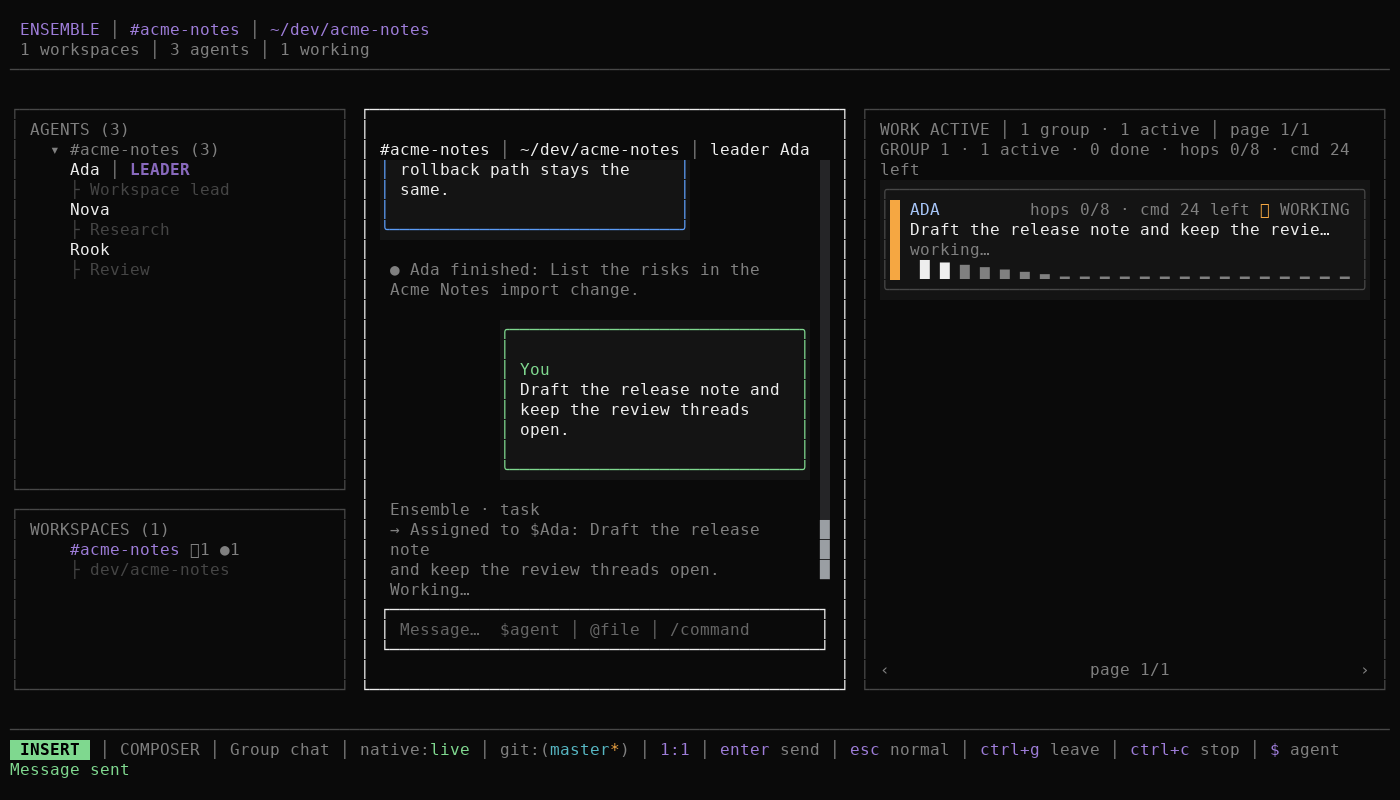
Ensemble opens on one workspace with three stable panes: a rail on the left, the chat in the center, and Work on the right. Each pane answers a different question: where you are, who is talking, and what the team is doing.
What you see
- Rail. The left pane has two sections. Agents groups each agent once under its primary workspace, with the role as its subline and a leader marker next to the leader's name. Workspaces lists the project directories you can open. A workspace can show an unread marker, a busy marker, or a paused marker.
- Chat. The center pane shows the selected conversation: a workspace group chat or a direct chat with one agent. Final messages, streaming replies, and work results share one transcript. The composer sits below the transcript and takes
$,@, and/completions. - Work. The right pane shows work items in ACTIVE by default. Press
fto switch to HISTORY. Pending approvals appear as a small summary under Work;vopens the full approvals view. - Width. At 118 columns or wider you see three full panes. Between 96 and 117 columns Work becomes compact. Below 96 columns Work becomes a right drawer.
Space b landSpace b rtoggle the left and right columns at any width, and the choice survives a restart.
Mental model
The three panes are three views over one workspace, not three stores:
- The rail is navigation over your roster and workspace list.
- The chat is the durable team record and the place where routing happens.
- Work is a live projection of the conversation's work items, grouped by the command that caused them.
One workspace is open at a time. Selecting an agent opens its direct chat; selecting a workspace opens its group chat. Settings and approvals are further surfaces over the same workspace state, so a change in one pane appears in the others without a separate refresh step.
Figure: one workspace, three views. The rail navigates, chat records and routes, and Work projects the resulting work items.
The shell is deliberately stable: focus moves between panes, but the pane layout does not change when you open a result, start a turn, or resolve an approval. That keeps the same spatial memory working across a long session.
Example
You open the Acme Notes workspace at ~/dev/acme-notes. The rail highlights the workspace, the chat shows the group transcript, and Work shows the most recent command's work items. You send "Summarize the open issues" without naming an agent. The leader, Ada, receives the command and answers in the group chat or delegates to a teammate; Work shows a work item for each agent that ran.
When a work item finishes, it leaves ACTIVE and appears in HISTORY. Press o on a focused work item to open that agent's native session, then F2 to return to the shell.
Next
- Agents, workspaces, and the leader: who receives a message.
- Guides: pane actions and task walkthroughs.
- Reference: exact keys, commands, and settings.